My Ultimate Terminal Setup - Alacritty + Tmux + Tmuxinator
Last year I was forced to switch my work laptop four times. By the fourth rebuild, I was done spending time on terminal setup instead of actual engineering work.
This gave me one clear requirement: my terminal needed to be config-driven and portable. I wanted to clone a repo, copy files, and get the same behavior every time.
I had been using iTerm2, but I moved to Alacritty for a reason: it is faster, lightweight, less bulky, and fully config-driven.
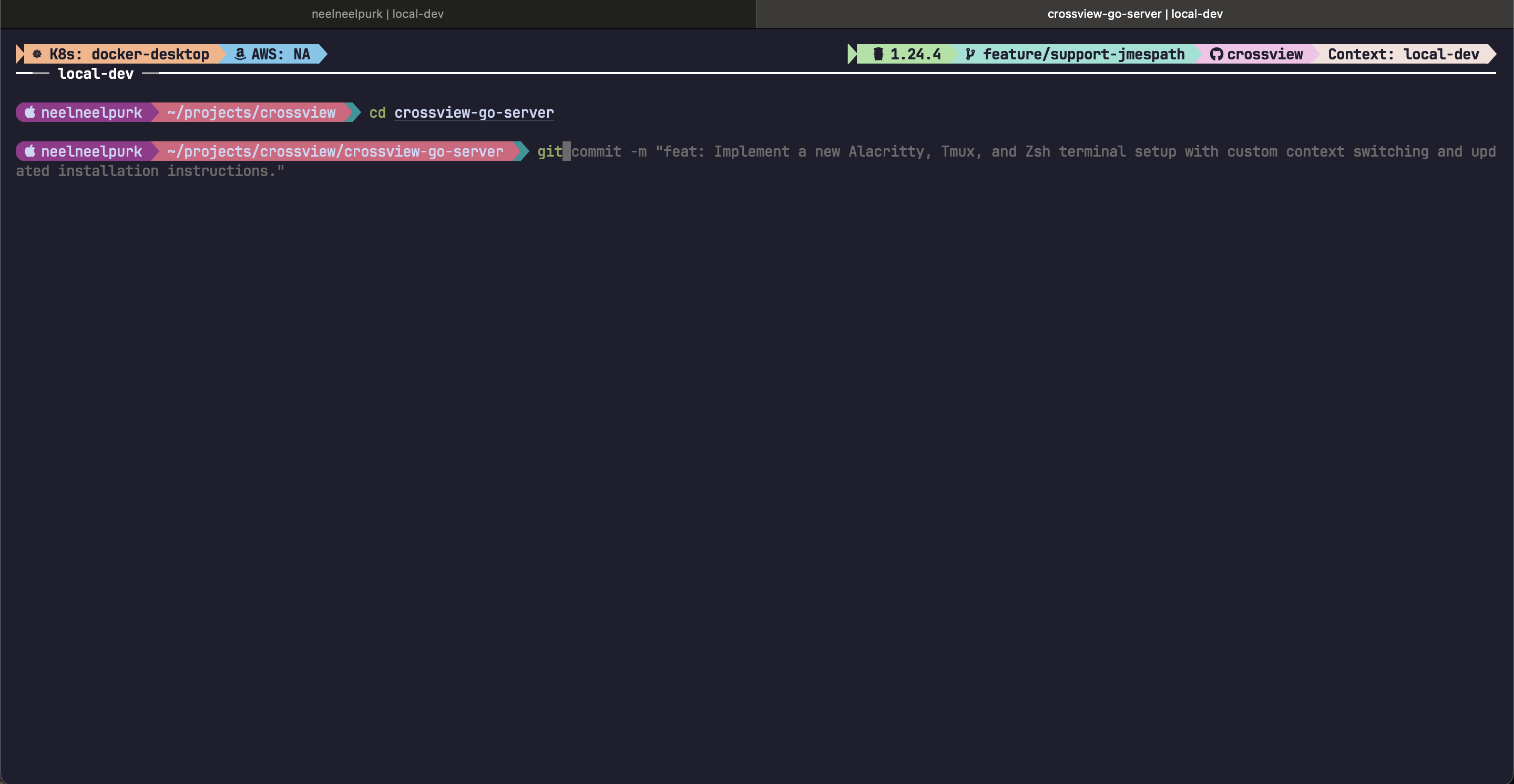
Source repo:
https://github.com/neelneelpurk/alacritty-terminal-setup
What I optimized for
-
Speed: no laggy rendering, quick startup.
-
Portability: same terminal behavior on every machine.
-
Safety rails: context is always visible before running commands.
Stack overview
-
Alacritty for terminal rendering.
-
tmux for runtime/session control and context display.
-
tmuxinator for reproducible terminal session definitions (IaC for terminal workflows).
-
Starship + Zsh + Antidote + cx(shell script) for prompt, shell behavior, and deterministic context switching.
Why Alacritty
Alacritty does one thing well: render quickly.
I keep it minimal and predictable: font, padding, keyboard behavior, and clipboard handling are all in one file.
Config:
In practice, this gives me fast startup, clean copy/paste behavior, and zero dependency on manual UI settings.
Why tmux is non-negotiable for this setup
Terminal tabs are UI state. tmux is runtime state.
That distinction matters when you work across multiple environments and long-running commands.
With tmux I get:
-
Session durability: processes survive terminal restarts.
-
Stable control plane: keybindings, panes, and status behavior are consistent across machines.
-
Persistent context visibility: AWS profile, Kubernetes context, git metadata, and active context are always on-screen.
Core tmux config:
https://github.com/neelneelpurk/alacritty-terminal-setup/blob/main/dotfiles/.tmux.conf
Status helpers: https://github.com/neelneelpurk/alacritty-terminal-setup/blob/main/dotfiles/.config/tmux/get-k8s-status.sh
tmuxinator as Infrastructure as Code for terminals
If tmux is the runtime, tmuxinator is the IaC layer.
Without tmuxinator, every new session turns into manual setup:
-
open the right pane layout
-
export environment variables
-
set labels and context
-
switch Kubernetes context
With tmuxinator, that startup logic is defined once and reproduced every time.
Template used in this repo:
This is why I call it IaC for terminals: session topology, environment bootstrap, and context initialization are codified and versioned.
Context switching with cx (your “context VM”)
This is small script written to help me in context switching. I treat context switching like infrastructure: declared in a file, applied with a command, and always visible.
Context catalog (contexts.csv)
I keep a context list in a CSV so it is easy to edit and version.
File:
https://github.com/neelneelpurk/alacritty-terminal-setup/blob/main/dotfiles/.config/cx/contexts.csv
Schema (from the header):
name,env,color,aws_profile,k8s_context
What cx set <context> actually does
The behavior depends on whether I am inside tmux.
Outside tmux:
-
Generates a new session id.
-
Writes the context name to
~/.config/cx/.current_context. -
If an AWS profile is configured, it checks identity and falls back to
aws sso loginif required. -
If k8s context is configured, it tries to do a
kubect config use-context -
Starts a tmuxinator session and passes settings (
context_name,env,color,aws_role,k8s_context).
Inside tmux:
-
Sets the pane title to the context name.
-
Exports
NAME,AWS_PROFILE,KUBECONFIG_CONTEXT, andDEPLOY_ENV. -
Renames the tmux window to
dirname | <context>. -
Resolves a real hex color for the active context and uses it to style the active tab.
-
Updates tmux status-right so the context stays visible next to the current git branch and repository name.
Implementation:
Color + naming helpers:
Quick safety check: cx health
Before I do anything serious, I want a cheap sanity check.
cx health prints the active signals and does fast online checks (AWS identity and Kubernetes cluster reachability) with short timeouts.
Prompt and shell (Zsh + Starship + Antidote)
This layer is what makes the whole setup feel sharp.
Why Antidote
I want a plugin system, but I do not want a huge framework to own my shell.
Antidote is the tradeoff I like:
-
Plugin list is plain text.
-
Load order is explicit.
-
Shell startup stays predictable.
Zsh config:
https://github.com/neelneelpurk/alacritty-terminal-setup/blob/main/dotfiles/.zshrc
Plugin list:
https://github.com/neelneelpurk/alacritty-terminal-setup/blob/main/dotfiles/.zsh_plugins.txt
In this setup, Zsh sources Antidote from the Homebrew path and runs antidote load, which loads the plugin set defined in .zsh_plugins.txt.
What is in that set (and why):
-
zsh-users/zsh-autosuggestions: faster command entry from history -
zsh-users/zsh-history-substring-search: quick recall for long commands -
zsh-users/zsh-completions: better completion coverage -
zsh-users/zsh-syntax-highlighting: immediate feedback when a command is wrong -
targeted
ohmyzshplugins (aws/kubectl/tmuxinator) without pulling the full framework -
local
cx-engine, so context switching is part of the same system
Autosuggest + autocomplete (the part you feel every day)
This is where Zsh goes from “works” to “fast”.
Autocomplete: reliable, scannable completions
I initialize completion right at the top so tools and plugins can register completions consistently:
autoload -Uz compinit && compinit -uThen I make completion usable (not spammy): a selectable menu, case-insensitive matching, and colored lists.
zstyle ':completion:*' menu select
zstyle ':completion:*' matcher-list 'm:{a-zA-Z}={A-Za-z}'
zstyle ':completion:*' list-colors "${(s.:.)LS_COLORS}"
Autosuggestions: ghost text from my history first
The key design choice is to prefer what I have actually run before:
ZSH_AUTOSUGGEST_STRATEGY=(history completion)
ZSH_AUTOSUGGEST_HIGHLIGHT_STYLE='fg=8'
Prefix history search: Up/Down becomes intent-aware
Up/Down is not “scroll history”. It is “search history by what I have started typing”.
So if I type kubectl and press Up, I only see previous kubectl ... commands. Same for git, terraform, anything.
autoload -U up-line-or-beginning-search
autoload -U down-line-or-beginning-search
zle -N up-line-or-beginning-search
zle -N down-line-or-beginning-search
bindkey '^[[A' up-line-or-beginning-search
bindkey '^[[B' down-line-or-beginning-search
Net result: completions are predictable, autosuggest is helpful (not random), and history recall stays scoped to my current intent.
Starship prompt
Starship stays intentionally local: path and runtime hints. High-risk context (AWS/K8s) belongs in tmux.
Config:
https://github.com/neelneelpurk/alacritty-terminal-setup/blob/main/dotfiles/.config/starship.toml
Vim defaults
I keep a .vimrc in the same repo so quick edits behave consistently across machines, especially inside tmux.
Config:
https://github.com/neelneelpurk/alacritty-terminal-setup/blob/main/dotfiles/.vimrc
Setup flow (macOS)
- Install dependencies:
brew install alacritty tmux tmuxinator antidote starship font-jetbrains-mono-nerd-font
- Copy dotfiles:
cp -a dotfiles/. $HOME/
- Start with context:
cx list
cx set local-dev
Final takeaway
Switching laptops four times in one year forced me to stop treating terminal setup as personal preference and start treating it as reproducible infrastructure.
Now the setup is fast, portable, and explicit. I spend less time rebuilding and less time second-guessing context before running commands.